If you have spent any meaningful time inside a Security Operations Centre - or have been responsible for one - you will know this feeling intimately. Alert fires. You open your SIEM. Then your EDR console. Then those cloud logs sitting in their own separate universe. Somewhere in the middle of all this, you are manually translating between user_name, userid, and account_identifier - three fields that mean exactly the same thing, from three different vendors, in three different formats.
This is not a new problem. It has existed since the first security tool was ever sold. But what is interesting now - and frankly what makes this a timely conversation - is that AI-driven security workflows are being built on top of this exact broken foundation. If the data going into your detection pipeline is messy, vendor-fragmented, and un-normalised, no amount of AI on top will save you. The garbage-in, garbage-out principle is ruthlessly unforgiving.
So when I came across Fleak’s OCSF Log Mapper, I decided to go in properly - not just a five-minute click-through, but a real, working, end-to-end examination. What follows is that account - complete with six hands-on sample log labs you can paste directly into the tool yourself.
01 - The Problem Space: Why Security Data Is Still a Mess in 2026
For Executives: Every security tool your organisation buys speaks its own data language. Before AI or automation can work reliably, someone has to translate between all of them. That translation work is costing your engineering team weeks, sometimes months, of effort per year - and it is almost entirely invisible to leadership.
Let us be concrete about the scale of this problem. A mid-size enterprise running a modern security stack will typically have a SIEM like Splunk, Microsoft Sentinel, or Google Chronicle; one or more EDR platforms (CrowdStrike, SentinelOne, Microsoft Defender); cloud provider logs from AWS CloudTrail, Azure Activity Logs, and GCP Audit Logs; network device logs from Cisco ASA, Palo Alto, or Fortinet firewalls; identity logs from Okta, Azure AD, or Ping Identity; and possibly application-layer logs, container logs, and Kubernetes audit trails on top of all that.
The following diagram shows the core problem. The same authentication failure event, fragmented across six common enterprise security tools, each naming fields differently - all pointing to one overwhelmed analyst who needs to produce a single detection rule:
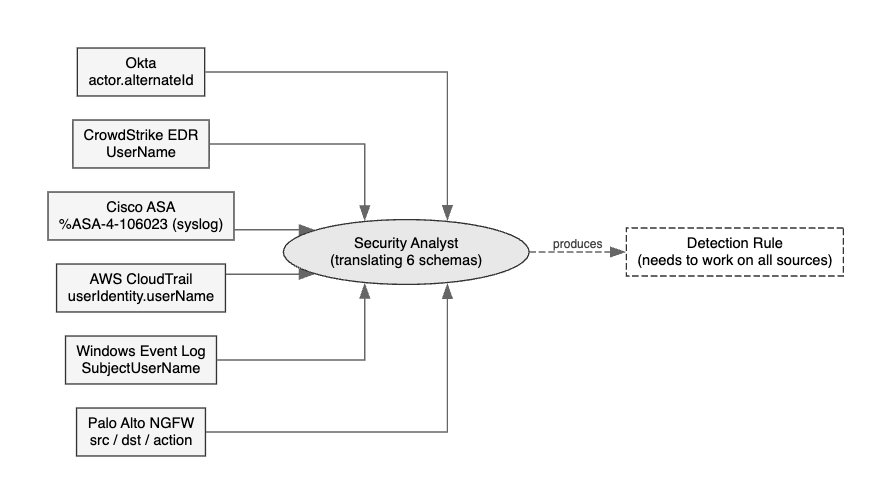
The following is the same event - a failed authentication - rendered across three common vendors. All three mean exactly the same thing. None of them look alike:
// Okta - Identity Provider
{
  "actor": {
    "type": "User",
    "alternateId": "john.doe@acme.com"
  },
  "eventType": "user.authentication.sso",
  "outcome": { "result": "FAILURE" },
  "published": "2026-02-18T08:23:11.000Z"
}
// Cisco ASA - Network Firewall
Feb 18 08:23:11 firewall : %ASA-4-106023: Deny tcp src outside:203.0.113.45/54321
  dst inside:10.0.0.50/443 by access-group "outside_in" [0x12345678, 0x0]
// CrowdStrike EDR - Endpoint
{
  "UserName": "ACME\\john.doe",
  "LogonType": "INTERACTIVE",
  "EventType": "AuthenticationEvent",
  "AuthFailedReason": "WRONG_PASSWORD"
}
All three are the same class of event. But without a normalisation layer, your detection rule written for Okta will not fire on the Cisco or CrowdStrike data. Your AI analyst will query different indices. Your SIEM dashboards will show incomplete counts. Your incident response team will miss correlated signals.
For Security Operations: This is why your threat hunters are spending 40–60% of their time writing and maintaining field mappings, parser logic, and data transformation scripts. It does not show up on executive dashboards. But without it, your entire detection capability is sitting on sand.
The security industry has known about this problem for years. The answer that has emerged - and gained real industry momentum - is the Open Cybersecurity Schema Framework (OCSF).
02 - The Standard: OCSF, the Common Language for Security Events
For Executives: OCSF is an industry-backed open standard - think of it as a universal translator for security log data. Born from a collaboration between AWS, Splunk, CrowdStrike, IBM, and 15 other major vendors, the goal is simple: if every tool speaks OCSF, detection rules work across all of them. One rule, every source.
OCSF was open-sourced in August 2022 and has been gaining adoption at impressive pace. The following diagram shows the full taxonomy - eight top-level categories, each containing multiple event classes, all sharing a common field dictionary:
The below is the schema heirachy example fo the authentication event:
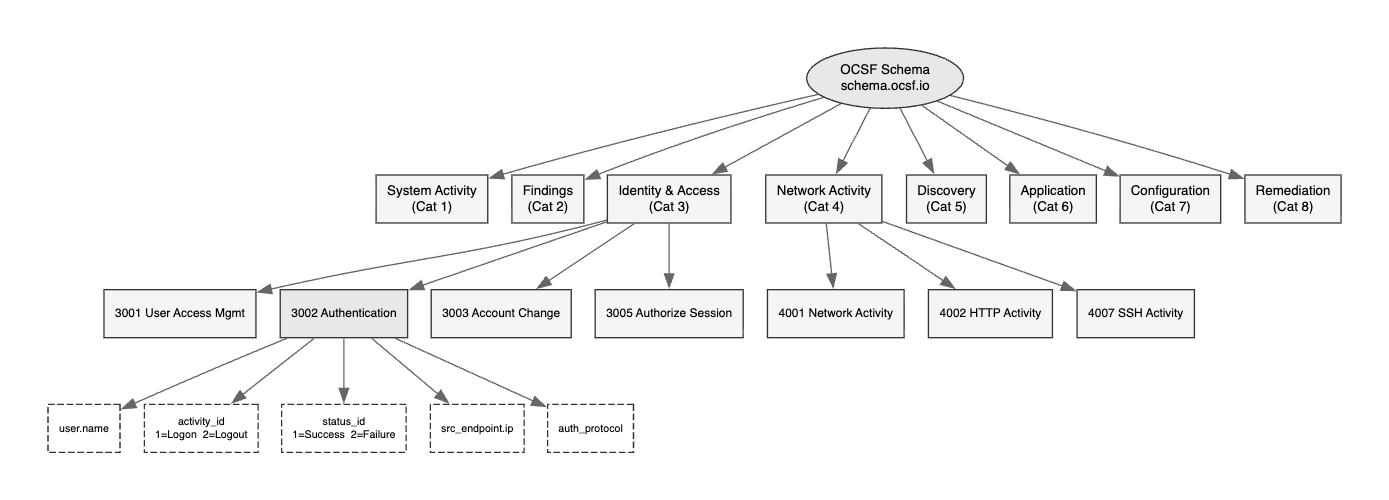
The key insight is in the leaf nodes. Every authentication event whether from Active Directory, Okta, or AWS IAM, MUST uses the same field names:
user.name       → who did the thing
activity_id     → what did they do  (1=Logon, 2=Logout, ...)
status_id       → how did it go     (1=Success, 2=Failure)
src_endpoint    → where from
auth_protocol   → how they authenticated
A comprehensive OCSF implementation typically takes two to four months of engineering time. The OCSF schema browser at schema.ocsf.io exposes over 80 event classes with hundreds of fields each. Getting it right requires deep familiarity with both the OCSF taxonomy and the source log formats. This is precisely where Fleak’s tooling earns its place.
“The standard was always good. The bottleneck was never understanding the why - it was surviving the how.”
03 - The Tool: What is Fleak, and What Does the OCSF Mapper Actually Do?
Fleak is a data workflow and transformation platform with a specific focus on security data engineering. Their product portfolio includes a broader data workflow builder and an execution engine called ZephFlow - but the piece we are examining here is their free community tool: the OCSF Log Mapper.
The pitch is clean: you bring your raw, vendor-specific logs, and the tool uses AI to generate OCSF-compliant mapping configurations. You do not need to be an OCSF expert. You do not need to manually look up category UIDs or stitch together transformation scripts.
For Executives: Think of the Fleak OCSF Mapper as the difference between hiring a specialist translator for each language pair, versus having a machine translation system that understands the intent and produces clean, reviewable output. One leading cybersecurity platform reportedly cut their integration onboarding from two quarters down to one week using Fleak’s technology - with a corresponding 4x revenue lift over six months.
The tool is available for free at app.ocsf.fleak.ai. No credit card, no enterprise negotiation required.
04 - Architecture: How It Works End to End
There are two distinct components in the Fleak solution, and understanding the separation of concerns between them is essential before evaluating either.
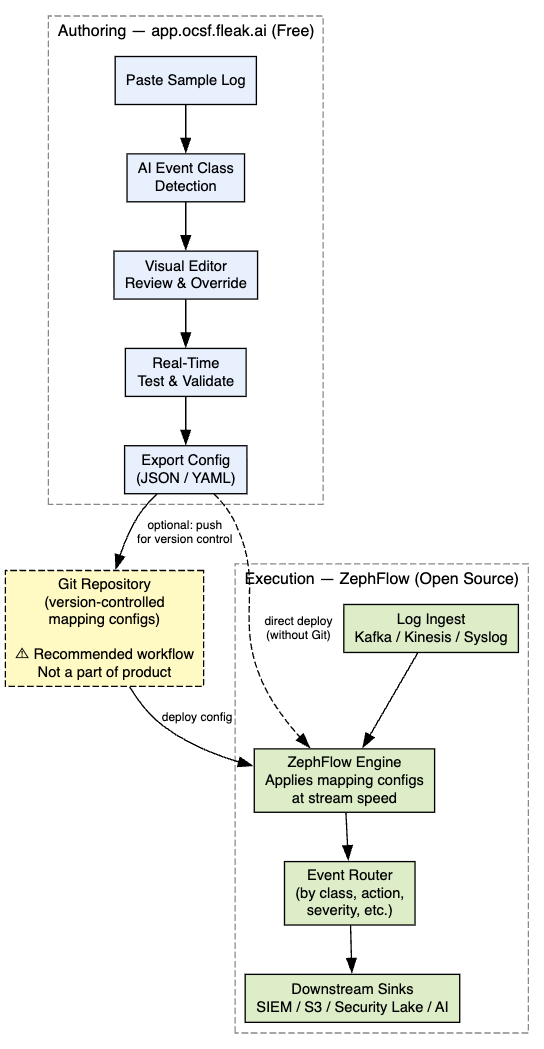
The OCSF Mapper is where you design and test your transformations - purely a design tool, nothing runs live. ZephFlow is the execution engine that processes your live log streams using the exported configuration files. The configurations are portable and can be deployed in your own infrastructure.
For Security Operations: The decoupling of mapping design from mapping execution is genuinely smart architecture. It means your security engineers can author and test OCSF configurations in a safe, web-based environment without ever touching your production log pipeline. This maps well to a GitOps or change management workflow.
05 - Technical Deep Dive: What the AI Is Actually Doing
For Engineers: This section goes deep into the mechanics. If you are evaluating at a strategic level, jump to Section 08.
The diagram below shows the internal decision flow of the AI when it receives a raw log and needs to produce an OCSF mapping:
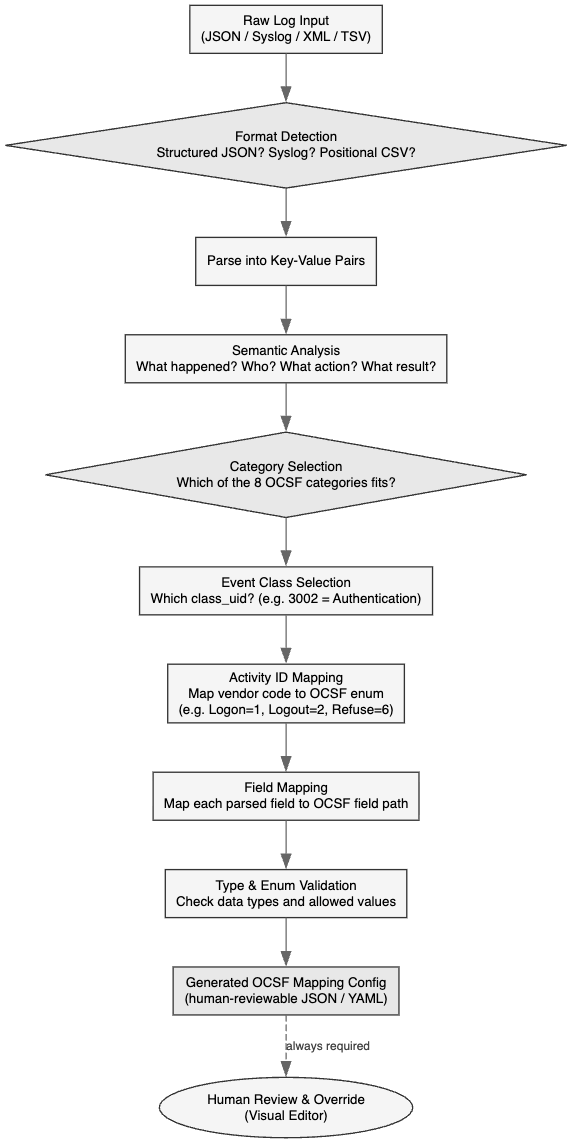
The key step is Semantic Analysis - the AI is not doing a lookup table. It is understanding the intent of the event. The Cisco %ASA-4-106023 code gets resolved to activity_id: 6 (Refuse) not because there is a hardcoded mapping for that message ID, but because the AI understands that “deny” in a network access control context maps to OCSF’s Refuse activity. This is semantic translation, not just syntactic renaming.
06 - Hands-On Sample Log Labs
This is where things get practical. The following six labs each contain a complete, realistic dummy log that you can paste directly into app.ocsf.fleak.ai right now. For each lab: the raw sample, step-by-step instructions, and the expected OCSF output so you can verify the AI is working correctly.
Example 1 - AWS CloudTrail: Suspicious AssumeRole Event
AssumeRole is one of the most abused APIs in AWS-based attacks. An attacker who compromises any IAM credential will typically try to assume a more privileged role. This is what that event looks like in raw CloudTrail JSON.
Raw Sample Log - save as lab1-cloudtrail.json and paste into the Fleak Mapper:
{
  "eventVersion": "1.08",
  "userIdentity": {
    "type": "IAMUser",
    "principalId": "AIDAEXAMPLEID123",
    "arn": "arn:aws:iam::123456789012:user/dev-pipeline",
    "accountId": "123456789012",
    "userName": "dev-pipeline"
  },
  "eventTime": "2026-02-18T03:41:22Z",
  "eventSource": "sts.amazonaws.com",
  "eventName": "AssumeRole",
  "awsRegion": "ap-south-1",
  "sourceIPAddress": "185.220.101.47",
  "userAgent": "aws-cli/2.9.0 Python/3.11.0 Linux/5.15",
  "requestParameters": {
    "roleArn": "arn:aws:iam::123456789012:role/Admin-Role",
    "roleSessionName": "assumed-admin",
    "durationSeconds": 3600
  },
  "responseElements": {
    "credentials": {
      "sessionToken": "FwoGZXIvYXdzEL...",
      "accessKeyId": "ASIAEXAMPLEKEY",
      "expiration": "2026-02-18T04:41:22Z"
    }
  },
  "errorCode": null,
  "requestID": "a3b4c5d6-e7f8-1234-abcd-ef0123456789",
  "eventID": "b1c2d3e4-f5a6-7890-bcde-f01234567890",
  "eventType": "AwsApiCall",
  "managementEvent": true,
  "recipientAccountId": "123456789012"
}
Step-by-Step Instructions for app.ocsf.fleak.ai:
Go to app.ocsf.fleak.ai and log in (free account).
Click “New Project” → name it
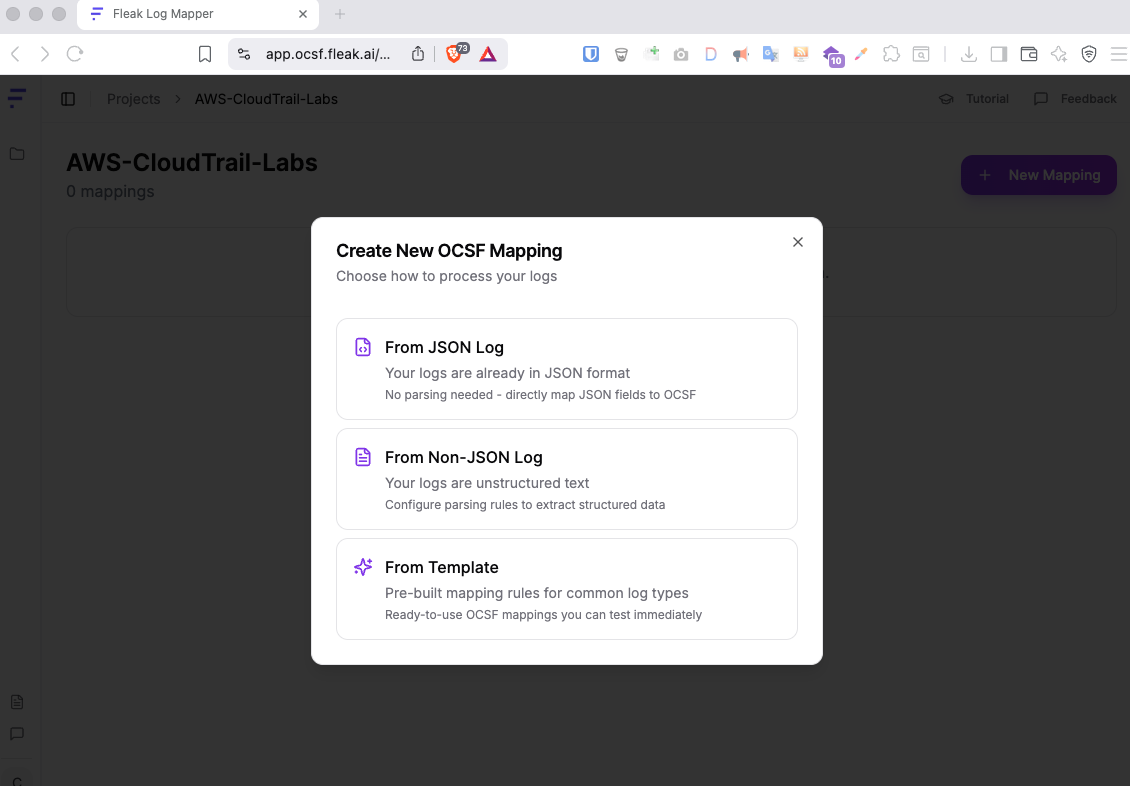
AWS-CloudTrail-Labs→ click “Create Project”.Inside the project, click “New Mapping” → select JSON log (you can select any based on your requirement).
- In the input panel, paste the entire JSON block above.
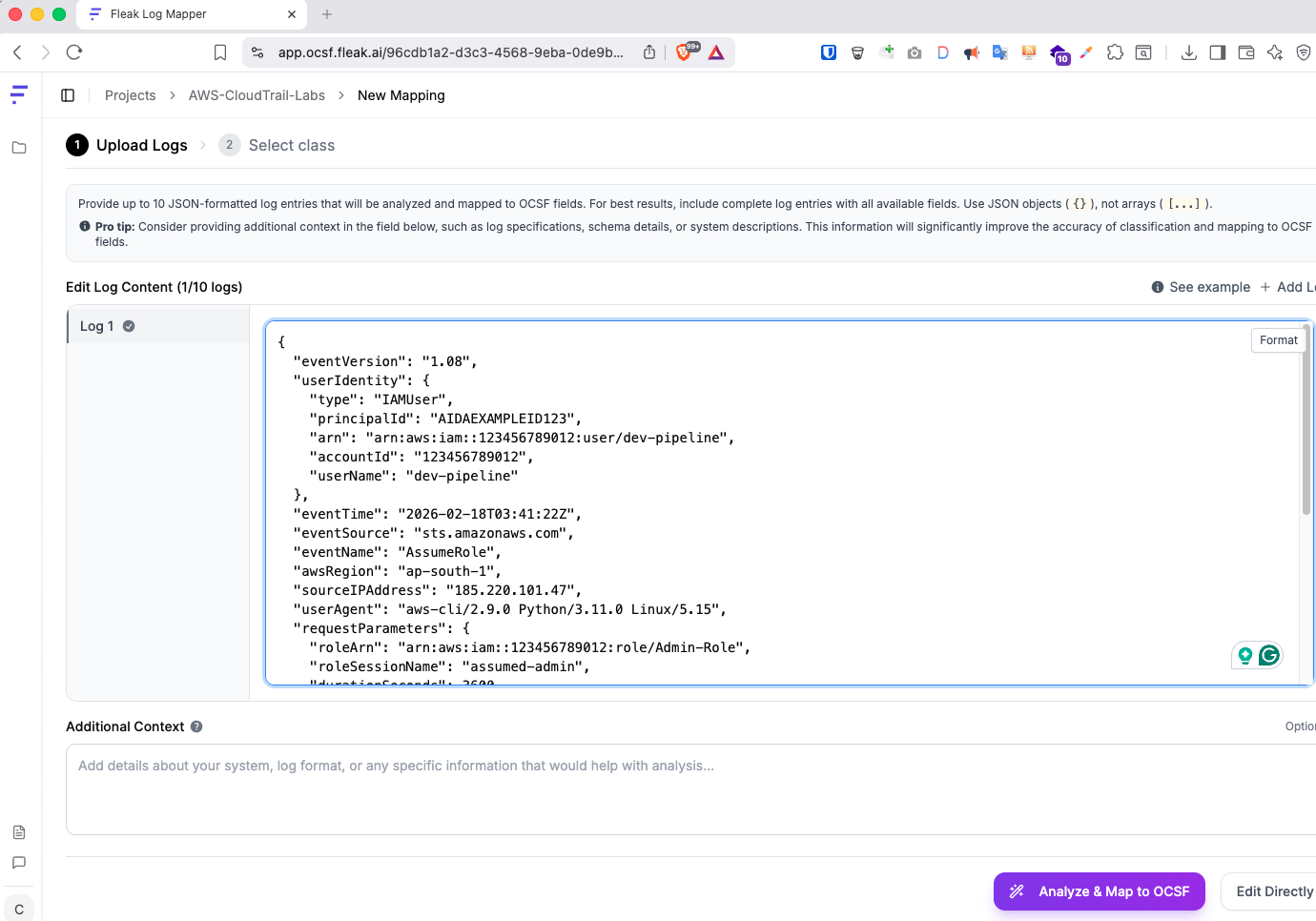
- Click “Analyse & Map to OCSF”. The AI should detect this as an Identity & Access Management event (class 3002 Authentication).
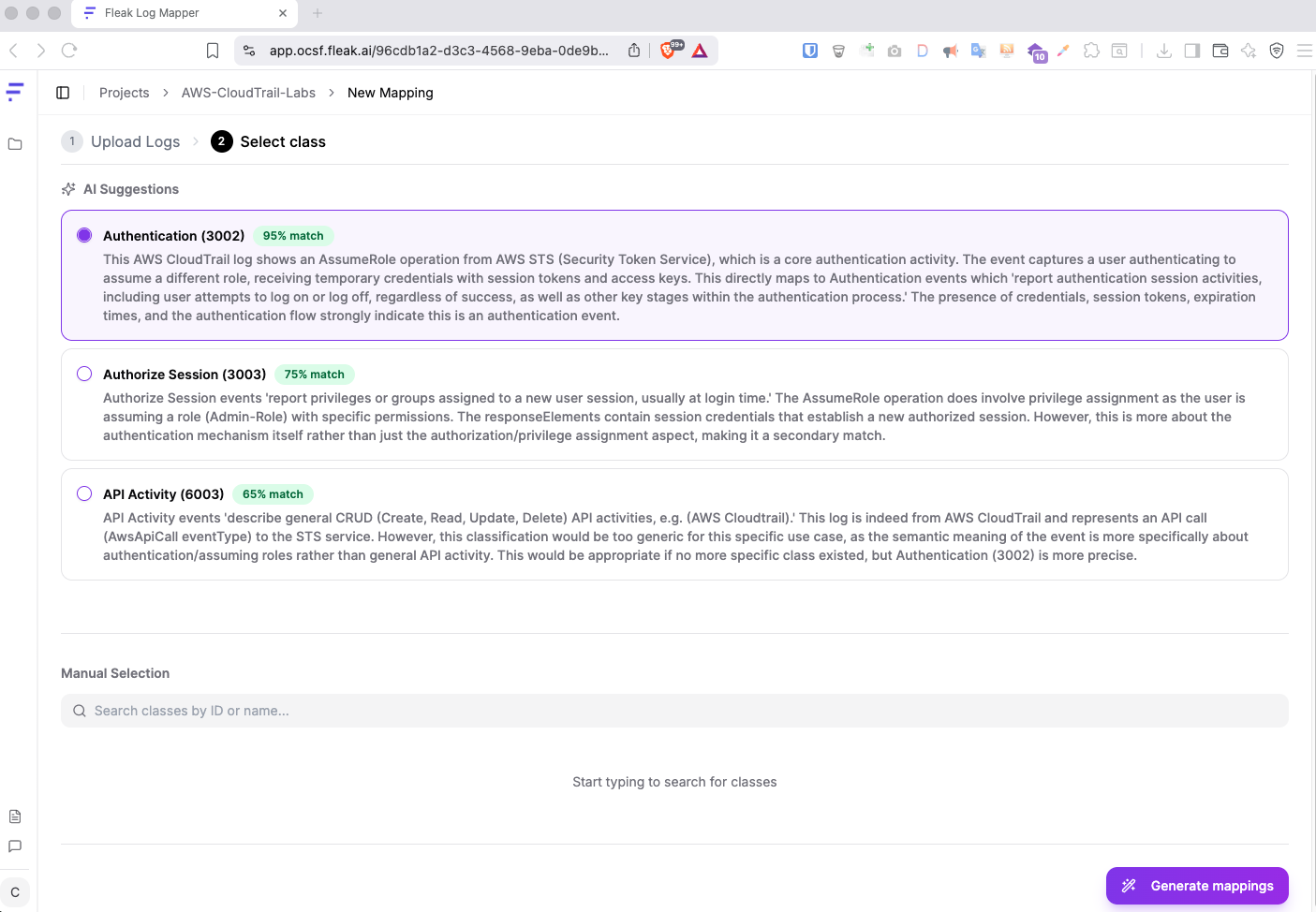
- Click on Generate Mapping and it will generate rule mapping for you which would look something like below.
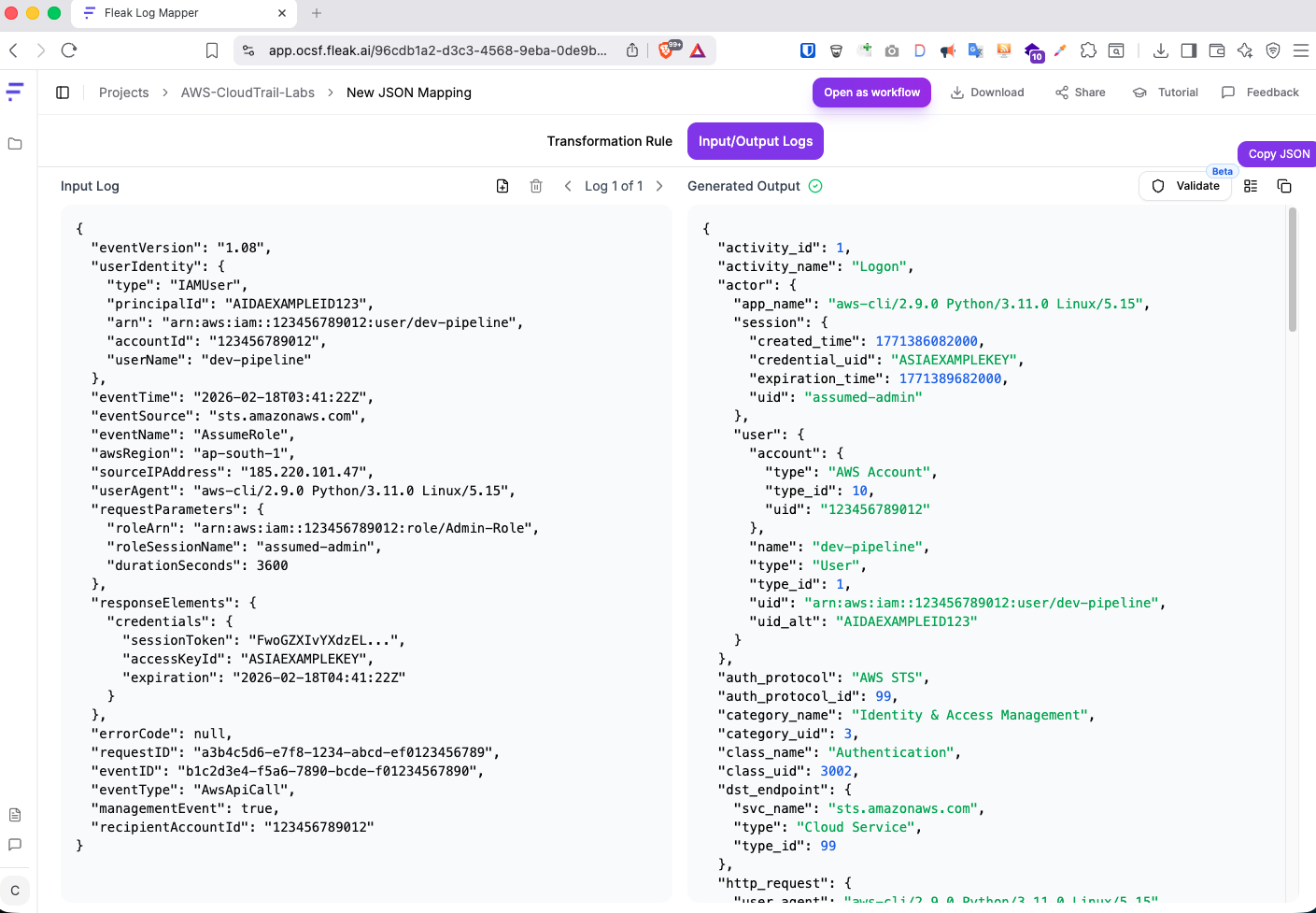
You can also know the rule transformation code.
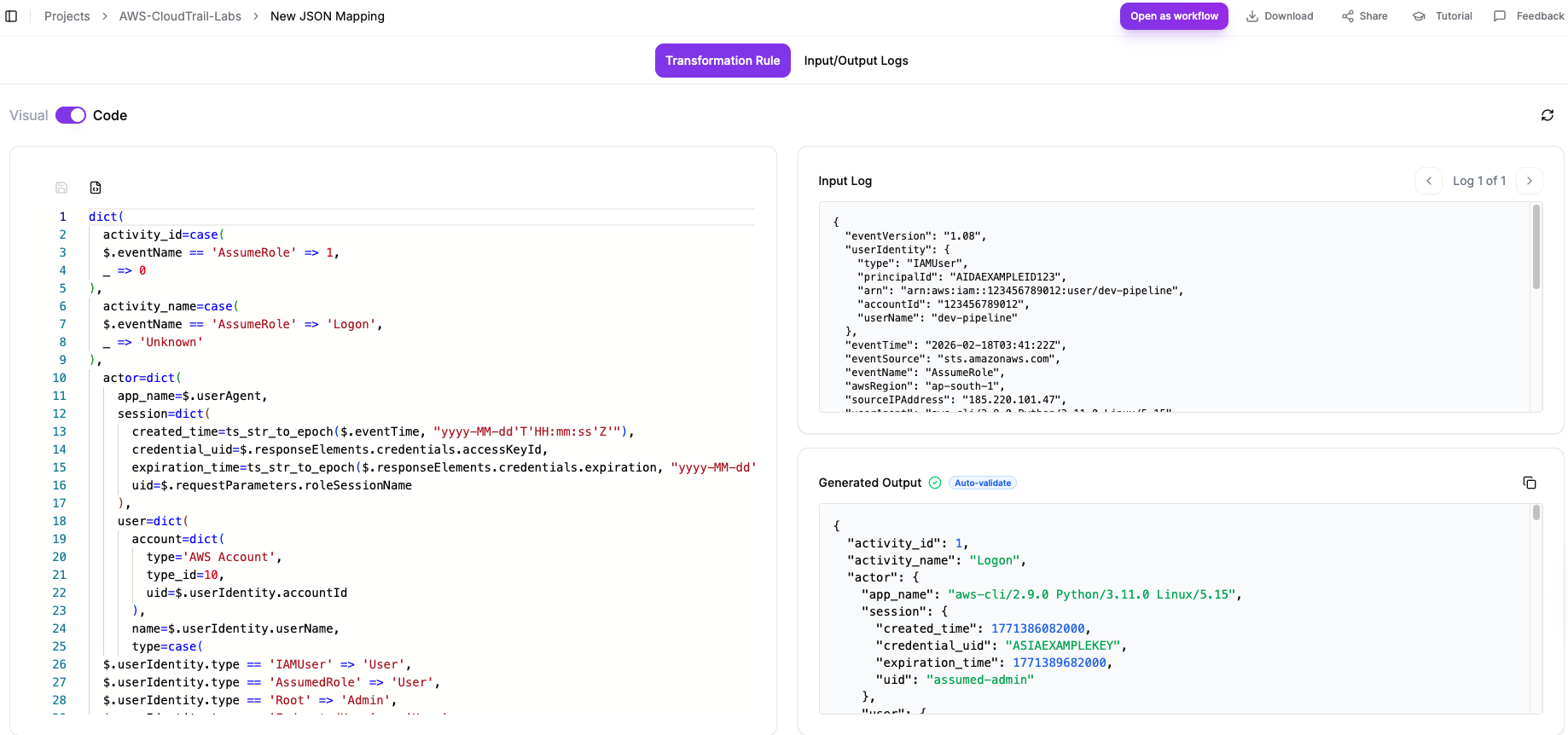
In the Visual Editor, verify that
userIdentity.userNameis mapped toactor.user.name, and thatsourceIPAddress→src_endpoint.ip.Click “Export or Copy paste” to download the mapping configuration file and add it to your any repository to be used.
OCSF Output:
{
  "activity_id": 1,
  "activity_name": "Logon",
  "actor": {
    "app_name": "aws-cli/2.9.0 Python/3.11.0 Linux/5.15",
    "session": {
      "created_time": 1771386082000,
      "credential_uid": "ASIAEXAMPLEKEY",
      "expiration_time": 1771389682000,
      "uid": "assumed-admin"
    },
    "user": {
      "account": {
        "type": "AWS Account",
        "type_id": 10,
        "uid": "123456789012"
      },
      "name": "dev-pipeline",
      "type": "User",
      "type_id": 1,
      "uid": "arn:aws:iam::123456789012:user/dev-pipeline",
      "uid_alt": "AIDAEXAMPLEID123"
    }
  },
  "auth_protocol": "AWS STS",
  "auth_protocol_id": 99,
  "category_name": "Identity & Access Management",
  "category_uid": 3,
  "class_name": "Authentication",
  "class_uid": 3002,
  "dst_endpoint": {
    "svc_name": "sts.amazonaws.com",
    "type": "Cloud Service",
    "type_id": 99
  },
  "http_request": {
    "user_agent": "aws-cli/2.9.0 Python/3.11.0 Linux/5.15"
  },
  "is_remote": true,
  "message": "AssumeRole operation on sts.amazonaws.com",
  "metadata": {
    "event_code": "AssumeRole",
    "log_name": "sts.amazonaws.com",
    "log_provider": "sts.amazonaws.com",
    "logged_time": 1771386082000,
    "original_time": "2026-02-18T03:41:22Z",
    "product": {
      "name": "AWS Security Token Service",
      "vendor_name": "Amazon Web Services"
    },
    "uid": "b1c2d3e4-f5a6-7890-bcde-f01234567890",
    "version": "1.6.0"
  },
  "observables": [
    {
      "name": "dst_endpoint",
      "type_id": 20
    },
    {
      "name": "session.credential_uid",
      "type_id": 19,
      "value": "ASIAEXAMPLEKEY"
    },
    {
      "name": "src_endpoint",
      "type_id": 20
    },
    {
      "name": "src_endpoint.owner",
      "type_id": 21
    },
    {
      "name": "src_endpoint.owner.name",
      "type_id": 4,
      "value": "dev-pipeline"
    },
    {
      "name": "src_endpoint.owner.uid",
      "type_id": 31,
      "value": "arn:aws:iam::123456789012:user/dev-pipeline"
    },
    {
      "name": "src_endpoint.owner.account.uid",
      "type_id": 35,
      "value": "123456789012"
    },
    {
      "name": "src_endpoint.ip",
      "type_id": 2,
      "value": "185.220.101.47"
    },
    {
      "name": "user",
      "type_id": 21
    },
    {
      "name": "user.name",
      "type_id": 4,
      "value": "dev-pipeline"
    },
    {
      "name": "user.uid",
      "type_id": 31,
      "value": "arn:aws:iam::123456789012:user/dev-pipeline"
    },
    {
      "name": "user.account.uid",
      "type_id": 35,
      "value": "123456789012"
    },
    {
      "name": "http_request.user_agent",
      "type_id": 16,
      "value": "aws-cli/2.9.0 Python/3.11.0 Linux/5.15"
    },
    {
      "name": "actor.session.credential_uid",
      "type_id": 19,
      "value": "ASIAEXAMPLEKEY"
    },
    {
      "name": "actor.user",
      "type_id": 21
    },
    {
      "name": "actor.user.name",
      "type_id": 4,
      "value": "dev-pipeline"
    },
    {
      "name": "actor.user.uid",
      "type_id": 31,
      "value": "arn:aws:iam::123456789012:user/dev-pipeline"
    },
    {
      "name": "actor.user.account.uid",
      "type_id": 35,
      "value": "123456789012"
    }
  ],
  "service": {
    "name": "sts.amazonaws.com"
  },
  "session": {
    "created_time": 1771386082000,
    "credential_uid": "ASIAEXAMPLEKEY",
    "expiration_time": 1771389682000,
    "issuer": "arn:aws:iam::123456789012:role/Admin-Role",
    "uid": "assumed-admin",
    "uid_alt": "arn:aws:iam::123456789012:role/Admin-Role"
  },
  "severity": "Informational",
  "severity_id": 1,
  "src_endpoint": {
    "ip": "185.220.101.47",
    "os": {
      "kernel_release": "",
      "name": "Linux",
      "type": "Linux",
      "type_id": 200
    },
    "owner": {
      "account": {
        "uid": "123456789012"
      },
      "name": "dev-pipeline",
      "type": "User",
      "type_id": 1,
      "uid": "arn:aws:iam::123456789012:user/dev-pipeline"
    },
    "type": "CLI Client",
    "type_id": 99
  },
  "status": "Success",
  "status_id": 1,
  "time": 1771386082000,
  "type_name": "Authentication: Logon",
  "type_uid": 300201,
  "unmapped": {
    "awsRegion": "ap-south-1",
    "eventType": "AwsApiCall",
    "eventVersion": "1.08",
    "managementEvent": true,
    "recipientAccountId": "123456789012",
    "requestID": "a3b4c5d6-e7f8-1234-abcd-ef0123456789"
  },
  "user": {
    "account": {
      "type": "AWS Account",
      "type_id": 10,
      "uid": "123456789012"
    },
    "name": "dev-pipeline",
    "type": "User",
    "type_id": 1,
    "uid": "arn:aws:iam::123456789012:user/dev-pipeline",
    "uid_alt": "AIDAEXAMPLEID123"
  }
}
What to Notice: The source IP 185.220.101.47 is a known Tor exit node. In the raw CloudTrail log, it is buried in sourceIPAddress. After OCSF normalisation, it lives in the standard src_endpoint.ip field - meaning your detection rule src_endpoint.ip IN tor_exit_list now fires on this event AND on every other log source that reports source IPs, with zero per-source customisation.
Example 2 - Windows Security Event Log: Password Spray (Event ID 4625)
Windows Event ID 4625 is one of the highest-volume events in any Windows environment and one of the most important. Password spray attacks generate thousands of these per minute. This is what a raw Windows Security Event looks like when exported as JSON via Winlogbeat:
Raw Sample Log - save as lab2-windows-4625.json:
{
  "winlog": {
    "channel": "Security",
    "computer_name": "DESKTOP-ACME-042",
    "event_id": 4625,
    "provider_name": "Microsoft-Windows-Security-Auditing",
    "record_id": 2847391,
    "time_created": "2026-02-18T07:55:03.412Z",
    "keywords": ["Audit Failure"],
    "task": "Logon",
    "event_data": {
      "SubjectUserSid": "S-1-0-0",
      "SubjectUserName": "-",
      "TargetUserName": "administrator",
      "TargetDomainName": "ACME",
      "Status": "0xC000006D",
      "FailureReason": "%%2313",
      "SubStatus": "0xC000006A",
      "LogonType": "3",
      "LogonProcessName": "NtLmSsp",
      "AuthenticationPackageName": "NTLM",
      "WorkstationName": "KALI-ATTACK-01",
      "IpAddress": "10.10.10.99",
      "IpPort": "49200"
    }
  }
}
Step-by-Step Instructions:
Following the same steps as listed in the above AWS topic, you will get below output.
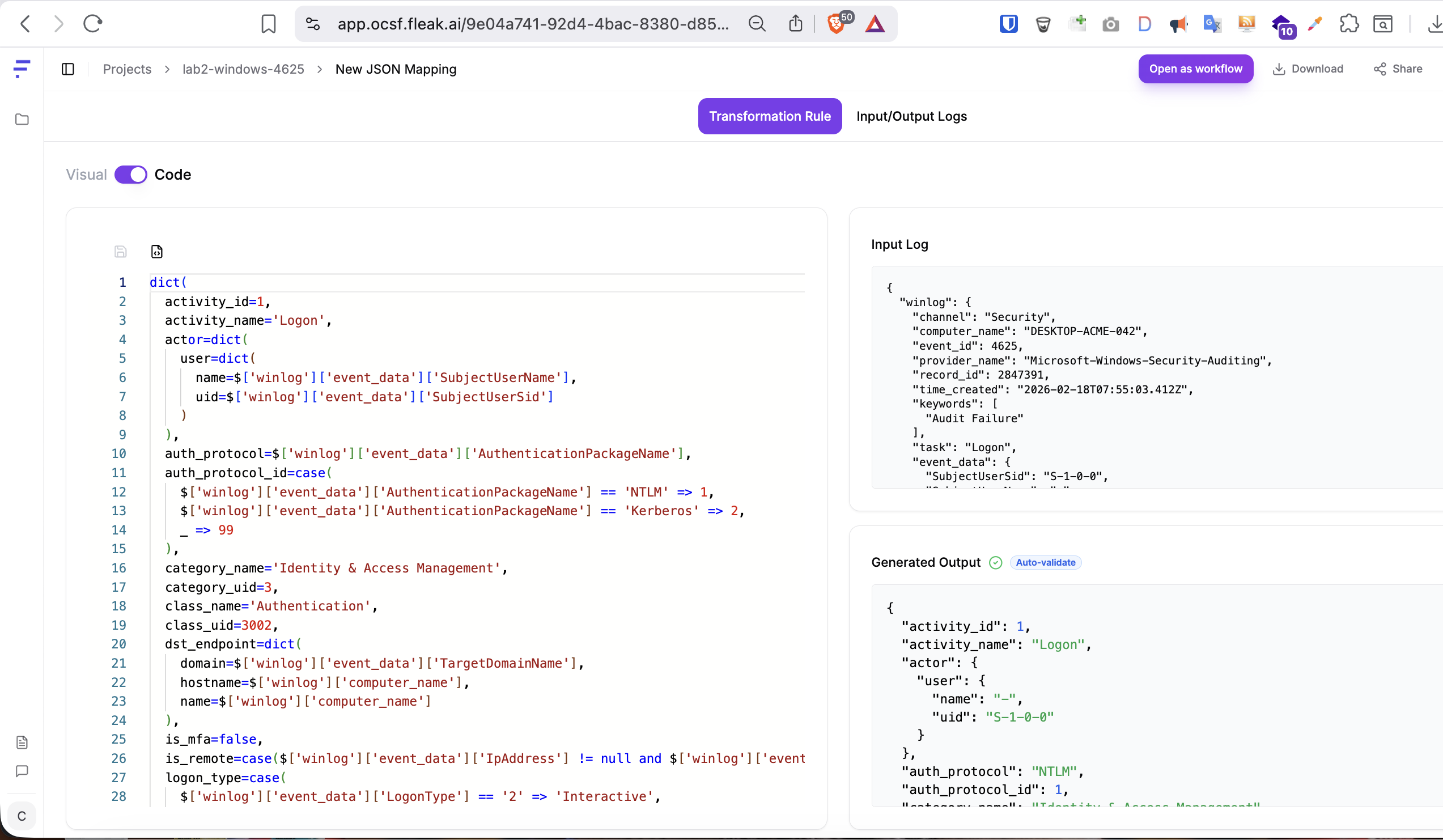
OCSF Output:
{
  "activity_id": 1,
  "activity_name": "Logon",
  "actor": {
    "user": {
      "name": "-",
      "uid": "S-1-0-0"
    }
  },
  "auth_protocol": "NTLM",
  "auth_protocol_id": 1,
  "category_name": "Identity & Access Management",
  "category_uid": 3,
  "class_name": "Authentication",
  "class_uid": 3002,
  "dst_endpoint": {
    "domain": "ACME",
    "hostname": "DESKTOP-ACME-042",
    "name": "DESKTOP-ACME-042"
  },
  "is_mfa": false,
  "is_remote": true,
  "logon_type": "Network",
  "logon_type_id": 3,
  "message": "Unknown user name or bad password.",
  "metadata": {
    "event_code": "4625",
    "log_name": "Security",
    "log_provider": "Microsoft-Windows-Security-Auditing",
    "logged_time": 1771401303412,
    "original_time": "2026-02-18T07:55:03.412Z",
    "product": {
      "name": "Windows Security Auditing",
      "vendor_name": "Microsoft"
    },
    "profiles": [
      "host"
    ],
    "uid": "2847391",
    "version": "1.6.0"
  },
  "observables": [
    {
      "name": "dst_endpoint",
      "type_id": 20
    },
    {
      "name": "dst_endpoint.hostname",
      "type_id": 1,
      "value": "DESKTOP-ACME-042"
    },
    {
      "name": "src_endpoint",
      "type_id": 20
    },
    {
      "name": "src_endpoint.port",
      "type_id": 11,
      "value": "49200"
    },
    {
      "name": "src_endpoint.ip",
      "type_id": 2,
      "value": "10.10.10.99"
    },
    {
      "name": "src_endpoint.hostname",
      "type_id": 1,
      "value": "KALI-ATTACK-01"
    },
    {
      "name": "user",
      "type_id": 21
    },
    {
      "name": "user.name",
      "type_id": 4,
      "value": "administrator"
    },
    {
      "name": "user.uid",
      "type_id": 31,
      "value": "S-1-0-0"
    },
    {
      "name": "actor.user",
      "type_id": 21
    },
    {
      "name": "actor.user.name",
      "type_id": 4,
      "value": "-"
    },
    {
      "name": "actor.user.uid",
      "type_id": 31,
      "value": "S-1-0-0"
    }
  ],
  "service": {
    "name": "NTLM"
  },
  "session": {
    "is_remote": true
  },
  "severity": "Medium",
  "severity_id": 3,
  "src_endpoint": {
    "hostname": "KALI-ATTACK-01",
    "ip": "10.10.10.99",
    "port": 49200
  },
  "status": "Failure",
  "status_code": "0xC000006D",
  "status_detail": "INVALID_CREDENTIALS",
  "status_id": 2,
  "time": 1771401303412,
  "type_name": "Authentication: Logon",
  "type_uid": 300201,
  "user": {
    "domain": "ACME",
    "name": "administrator",
    "type": "User",
    "type_id": 1,
    "uid": "S-1-0-0"
  }
}
What to Notice: The Windows hex status code 0xC000006D is semantically translated to "Unknown user name or bad password" - not stored raw. A detection rule querying status_detail CONTAINS "bad password" AND src_endpoint.ip == src_endpoint.ip will now catch this Windows event and any other source reporting the same failure reason in their own proprietary codes, all translated to the same OCSF field.
Example 3 - Palo Alto NGFW: Log4Shell Threat Alert
Palo Alto threat logs are particularly interesting - a lot of security-relevant information packed into a single comma-delimited syslog line. This is also a good test of the mapper’s ability to handle positional CSV text.
Raw Sample Log - save as lab3-paloalto-threat.txt:
Feb 18 2026 09:12:47 PA-VM-5250 1,2026/02/18 09:12:47,012345678901,THREAT,vulnerability,2049,2026/02/18 09:12:47,203.0.113.88,10.0.2.45,203.0.113.88,10.0.2.45,Allow-Inbound,john.doe,vsys1,untrust,trust,ethernet1/1,ethernet1/2,Splunk-Forwarding,2026/02/18 09:12:47,54321,1,44821,443,0,0,0x80004000,tcp,alert,CVE-2021-44228,Log4Shell Remote Code Execution,critical,server-to-client,1234567,0x2000000000000000,United States,10.0.2.0-10.0.2.255,0,14,0,complete,,,,,,,1,0,0,0,corp-dmz-seg,0x0,CVE-2021-44228,Medium,client-to-server
Step-by-Step Instructions:
Following the same steps as listed in the above sections, you will get below output.
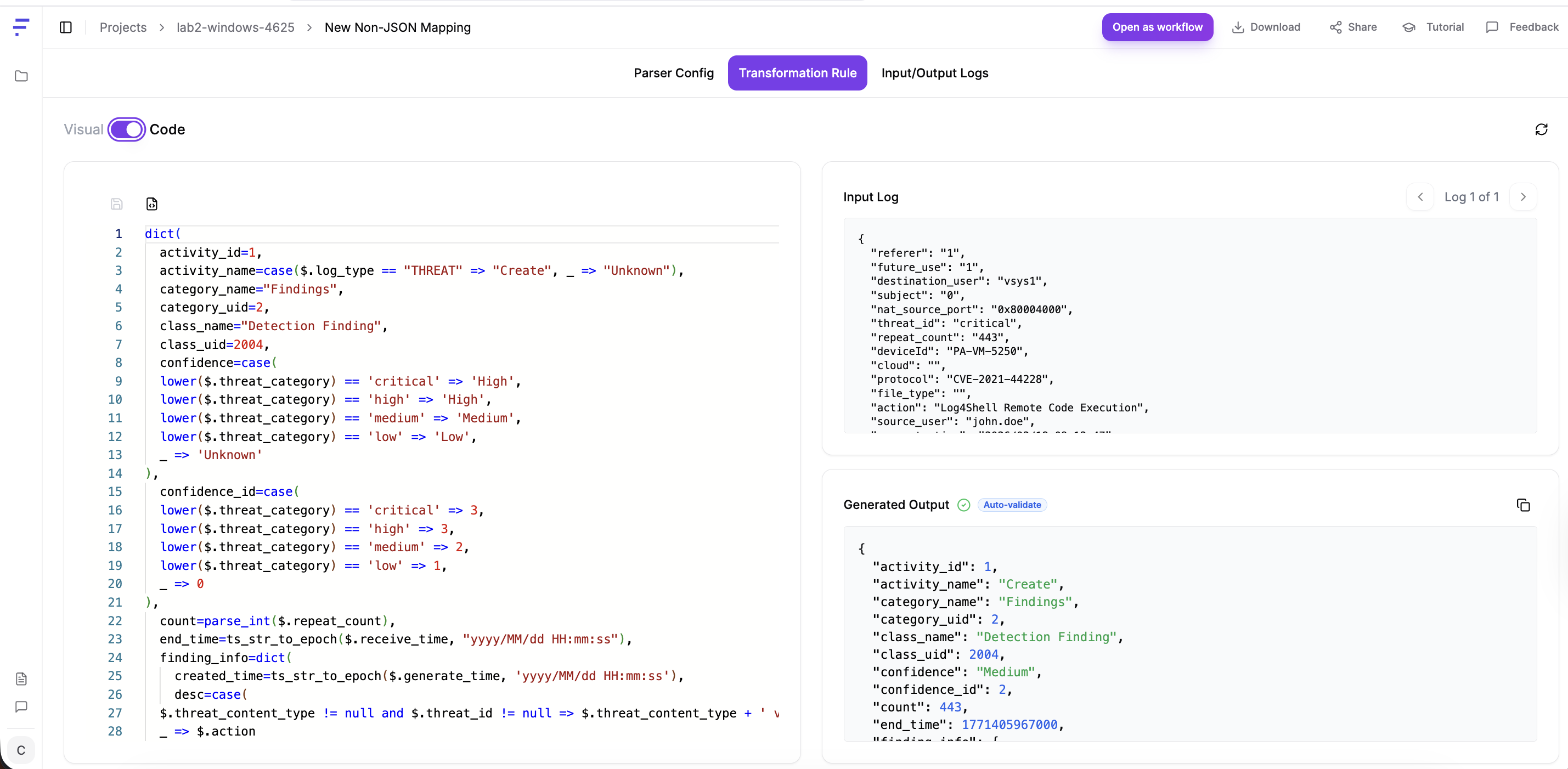
OCSF Output:
{
  "activity_id": 1,
  "activity_name": "Create",
  "category_name": "Findings",
  "category_uid": 2,
  "class_name": "Detection Finding",
  "class_uid": 2004,
  "confidence": "Medium",
  "confidence_id": 2,
  "count": 443,
  "end_time": 1771405967000,
  "finding_info": {
    "created_time": 1771405967000,
    "desc": "vulnerability vulnerability detected: critical - Log4Shell Remote Code Execution (CVE: CVE-2021-44228)",
    "first_seen_time": 1771405967000,
    "last_seen_time": 1771405967000,
    "modified_time": 1771405967000,
    "product": {
      "name": "Palo Alto Networks Firewall",
      "uid": "PA-VM-5250",
      "vendor_name": "Palo Alto Networks"
    },
    "title": "Log4Shell Remote Code Execution",
    "types": [
      "vulnerability"
    ],
    "uid": "012345678901"
  },
  "is_alert": true,
  "message": "Log4Shell Remote Code Execution",
  "metadata": {
    "log_name": "THREAT",
    "logged_time": 1771405967000,
    "original_time": "Feb 18 2026 09:12:47",
    "product": {
      "name": "Palo Alto Networks Firewall",
      "vendor_name": "Palo Alto Networks"
    },
    "uid": "012345678901",
    "version": "1.6.0"
  },
  "observables": [
    {
      "name": "resources[].ip",
      "type_id": 2,
      "value": "10.0.2.45"
    },
    {
      "name": "resources[].uid",
      "type_id": 10,
      "value": "10.0.2.45"
    },
    {
      "name": "resources[].ip",
      "type_id": 2,
      "value": "203.0.113.88"
    },
    {
      "name": "resources[].uid",
      "type_id": 10,
      "value": "203.0.113.88"
    },
    {
      "name": "resources[].name",
      "type_id": 38,
      "value": "PA-VM-5250"
    },
    {
      "name": "resources[].uid",
      "type_id": 10,
      "value": "PA-VM-5250"
    }
  ],
  "raw_data": "Feb 18 2026 09:12:47 PA-VM-5250 1,2026/02/18 09:12:47,012345678901,THREAT,vulnerability,2049,2026/02/18 09:12:47,203.0.113.88,10.0.2.45,203.0.113.88,10.0.2.45,Allow-Inbound,john.doe,vsys1,untrust,trust,ethernet1/1,ethernet1/2,Splunk-Forwarding,2026/02/18 09:12:47,54321,1,44821,443,0,0,0x80004000,tcp,alert,CVE-2021-44228,Log4Shell Remote Code Execution,critical,server-to-client,1234567,0x2000000000000000,United States,10.0.2.0-10.0.2.255,0,14,0,complete,,,,,,,1,0,0,0,corp-dmz-seg,0x0,CVE-2021-44228,Medium,client-to-server",
  "resources": [
    {
      "ip": "10.0.2.45",
      "role": "Target",
      "role_id": 1,
      "type": "IP Address",
      "uid": "10.0.2.45"
    },
    {
      "ip": "203.0.113.88",
      "role": "Actor",
      "role_id": 2,
      "type": "IP Address",
      "uid": "203.0.113.88"
    },
    {
      "name": "PA-VM-5250",
      "role": "Related",
      "role_id": 4,
      "type": "Security Device",
      "uid": "PA-VM-5250"
    }
  ],
  "severity": "Medium",
  "severity_id": 3,
  "start_time": 1771405967000,
  "status_detail": "alert",
  "time": 1771405967000,
  "type_name": "Detection Finding: Create",
  "type_uid": 200401,
  "unmapped": {
    "action_flags": "10.0.2.0-10.0.2.255",
    "application": "untrust",
    "category": "server-to-client",
    "cloud": "",
    "config_version": "2049",
    "content_type": "0",
    "content_version": "client-to-server",
    "destination_country": "14",
    "destination_port": "0",
    "destination_user": "vsys1",
    "destination_zone": "ethernet1/2",
    "device_name": "CVE-2021-44228",
    "direction": "0x2000000000000000",
    "file_digest": "",
    "file_type": "",
    "future_use": "1",
    "inbound_interface": "Splunk-Forwarding",
    "log_action": "54321",
    "nat_destination_ip": "10.0.2.45",
    "nat_destination_port": "tcp",
    "nat_source_ip": "203.0.113.88",
    "nat_source_port": "0x80004000",
    "outbound_interface": "2026/02/18 09:12:47",
    "pcap_id": "complete",
    "recipient": "0",
    "referer": "1",
    "report_id": "corp-dmz-seg",
    "rule_name": "Allow-Inbound",
    "sender": "0",
    "sequence_number": "United States",
    "session_id": "44821",
    "severity": "1234567",
    "source_country": "0",
    "source_port": "0",
    "source_user": "john.doe",
    "source_zone": "ethernet1/1",
    "subject": "0",
    "time_logged": "1",
    "url_index": "",
    "user_agent": "",
    "virtual_system": "trust",
    "virtual_system_name": "0x0",
    "x_forwarded_for": ""
  }
}
What to Notice: This is where the AI earns its keep on unstructured text. Extracting CVE identifiers, mapping positional CSV columns to named OCSF fields, and translating Palo Alto’s internal severity levels to OCSF severity enums - all without a single regex. Check carefully whether the AI correctly identifies column positions; Palo Alto has slightly different column orderings across firmware versions, which is a real production edge case.
Example 4 - Zeek (Bro) Network Sensor: conn.log with C2 Pattern
Zeek is widely used for network traffic analysis. Its conn.log is a tab-separated format with a metadata header. This tests the mapper’s ability to handle TSV with Zeek-specific state abbreviations.
Raw Sample Log - save as lab4-zeek-conn.log:
#separator \x09
#set_separator	,
#empty_field	(empty)
#unset_field	-
#path	conn
#fields	ts	uid	id.orig_h	id.orig_p	id.resp_h	id.resp_p	proto	service	duration	orig_bytes	resp_bytes	conn_state	local_orig	missed_bytes	history
#types	time	string	addr	port	addr	port	enum	string	interval	count	count	string	bool	count	string
1739870100.123456	CRnC0F3KBYZ1234567	10.10.10.5	54876	185.220.101.47	4444	tcp	-	0.048271	512	0	S1	T	0	ShADfFr
1739870101.234567	Dab4F1MCKZQ9876543	10.10.10.5	54877	185.220.101.47	4444	tcp	-	120.341200	204800	51200	SF	T	0	ShADadFfR
1739870102.345678	E7hG2N4PLXR1122334	192.168.1.200	12345	10.0.0.53	53	udp	dns	0.001234	72	188	SF	F	0	Dd
Step-by-Step Instructions:
Following the same steps as listed in the above sections, you will get below output.
OCSF Output:
{
  "activity_id": 1,
  "activity_name": "Open",
  "app_name": null,
  "category_name": "Network Activity",
  "category_uid": 4,
  "class_name": "Network Activity",
  "class_uid": 4001,
  "connection_info": {
    "direction": "Outbound",
    "direction_id": 2,
    "flag_history": "ShADfFr",
    "protocol_name": "tcp",
    "protocol_num": 6,
    "uid": "CRnC0F3KBYZ1234567"
  },
  "dst_endpoint": {
    "ip": "185.220.101.47",
    "port": 4444
  },
  "duration": 48,
  "is_src_dst_assignment_known": true,
  "metadata": {
    "log_name": "conn",
    "original_time": "1739870100.123456",
    "product": {
      "name": "Zeek",
      "vendor_name": "Zeek"
    },
    "uid": "CRnC0F3KBYZ1234567",
    "version": "1.6.0"
  },
  "observables": [
    {
      "name": "dst_endpoint",
      "type_id": 20
    },
    {
      "name": "dst_endpoint.port",
      "type_id": 11,
      "value": "4444"
    },
    {
      "name": "dst_endpoint.ip",
      "type_id": 2,
      "value": "185.220.101.47"
    },
    {
      "name": "src_endpoint",
      "type_id": 20
    },
    {
      "name": "src_endpoint.port",
      "type_id": 11,
      "value": "54876"
    },
    {
      "name": "src_endpoint.ip",
      "type_id": 2,
      "value": "10.10.10.5"
    }
  ],
  "severity": "Informational",
  "severity_id": 1,
  "src_endpoint": {
    "ip": "10.10.10.5",
    "port": 54876
  },
  "status": "Failure",
  "status_detail": "S1",
  "status_id": 2,
  "time": 1739870100123,
  "traffic": {
    "bytes": 512,
    "bytes_in": 0,
    "bytes_missed": 0,
    "bytes_out": 512
  },
  "type_name": "Network Activity: Open",
  "type_uid": 400101
}
What to Notice: Port 4444 is a canonical Metasploit listener port. The second row shows 120 seconds of duration with 200KB outbound transfer - characteristic of an active command-and-control session. Once normalised to OCSF, a single detection query dst_endpoint.port == 4444 catches this regardless of whether the sensor is Zeek, Suricata, or a commercial NDR platform.
Example 5 - Okta System Log: Impossible Travel
This lab demonstrates a classic security signal - a user authenticating from two geographically distant locations within an impossibly short time window.
Raw Sample Log - save both events as lab6-okta-impossible-travel.json (use the first event to generate the mapping, then test with both):
{
    "actor": {
      "id": "00u1abc2DEF3GHI456",
      "type": "User",
      "alternateId": "priya.sharma@acme.com",
      "displayName": "Priya Sharma"
    },
    "client": {
      "ipAddress": "103.21.244.0",
      "geographicalContext": {
        "country": "India",
        "state": "Karnataka",
        "city": "Bengaluru"
      },
      "userAgent": {
        "rawUserAgent": "Mozilla/5.0 (iPhone; CPU iPhone OS 17_0)",
        "os": "iOS",
        "browser": "SAFARI"
      }
    },
    "eventType": "user.session.start",
    "outcome": { "result": "SUCCESS" },
    "published": "2026-02-18T08:00:00.000Z",
    "securityContext": { "isProxy": false, "isTor": false },
    "uuid": "f1e2d3c4-b5a6-7890-fedc-ba0987654321",
    "authenticationContext": {
      "externalSessionId": "idx_session_abc123",
      "interface": "SAML2",
      "credentialType": "PASSWORD_IWA"
    }
  }
Step-by-Step Instructions:
Following the same steps as listed in the above sections, you will get below output.
OCSF Output:
{
  "activity_id": 1,
  "activity_name": "Logon",
  "actor": {
    "session": {
      "created_time": 1771401600000,
      "uid": "idx_session_abc123"
    },
    "user": {
      "display_name": "Priya Sharma",
      "email_addr": "priya.sharma@acme.com",
      "name": "priya.sharma@acme.com",
      "type": "User",
      "type_id": 1,
      "uid": "00u1abc2DEF3GHI456"
    }
  },
  "auth_protocol": "SAML",
  "auth_protocol_id": 5,
  "category_name": "Identity & Access Management",
  "category_uid": 3,
  "class_name": "Authentication",
  "class_uid": 3002,
  "http_request": {
    "user_agent": "Mozilla/5.0 (iPhone; CPU iPhone OS 17_0)"
  },
  "is_mfa": false,
  "is_remote": true,
  "logon_type": "Network",
  "logon_type_id": 3,
  "message": "User session started",
  "metadata": {
    "logged_time": 1771401600000,
    "original_time": "2026-02-18T08:00:00.000Z",
    "product": {
      "name": "Okta",
      "vendor_name": "Okta"
    },
    "uid": "f1e2d3c4-b5a6-7890-fedc-ba0987654321",
    "version": "1.6.0"
  },
  "observables": [
    {
      "name": "src_endpoint",
      "type_id": 20
    },
    {
      "name": "src_endpoint.ip",
      "type_id": 2,
      "value": "103.21.244.0"
    },
    {
      "name": "src_endpoint.location",
      "type_id": 26
    },
    {
      "name": "src_endpoint.location.country",
      "type_id": 14,
      "value": "India"
    },
    {
      "name": "user",
      "type_id": 21
    },
    {
      "name": "user.name",
      "type_id": 4,
      "value": "priya.sharma@acme.com"
    },
    {
      "name": "user.uid",
      "type_id": 31,
      "value": "00u1abc2DEF3GHI456"
    },
    {
      "name": "user.email_addr",
      "type_id": 5,
      "value": "priya.sharma@acme.com"
    },
    {
      "name": "http_request.user_agent",
      "type_id": 16,
      "value": "Mozilla/5.0 (iPhone; CPU iPhone OS 17_0)"
    },
    {
      "name": "actor.user",
      "type_id": 21
    },
    {
      "name": "actor.user.name",
      "type_id": 4,
      "value": "priya.sharma@acme.com"
    },
    {
      "name": "actor.user.uid",
      "type_id": 31,
      "value": "00u1abc2DEF3GHI456"
    },
    {
      "name": "actor.user.email_addr",
      "type_id": 5,
      "value": "priya.sharma@acme.com"
    }
  ],
  "service": {
    "name": "SAML2",
    "uid": "idx_session_abc123"
  },
  "session": {
    "created_time": 1771401600000,
    "is_remote": true,
    "issuer": "SAML2",
    "uid": "idx_session_abc123",
    "uuid": "f1e2d3c4-b5a6-7890-fedc-ba0987654321"
  },
  "severity": "Informational",
  "severity_id": 1,
  "src_endpoint": {
    "ip": "103.21.244.0",
    "location": {
      "city": "Bengaluru",
      "country": "India",
      "region": "Karnataka"
    },
    "os": {
      "name": "iOS",
      "type": "iOS",
      "type_id": 301
    },
    "type": "Mobile",
    "type_id": 5
  },
  "status": "Success",
  "status_code": "SUCCESS",
  "status_detail": "Authentication successful",
  "status_id": 1,
  "time": 1771401600000,
  "type_name": "Authentication: Logon",
  "type_uid": 300201,
  "unmapped": {
    "securityContext": {
      "isProxy": false,
      "isTor": false
    }
  },
  "user": {
    "display_name": "Priya Sharma",
    "email_addr": "priya.sharma@acme.com",
    "full_name": "Priya Sharma",
    "name": "priya.sharma@acme.com",
    "type": "User",
    "type_id": 1,
    "uid": "00u1abc2DEF3GHI456"
  }
}
07 - ZephFlow: The Open-Source Execution Engine
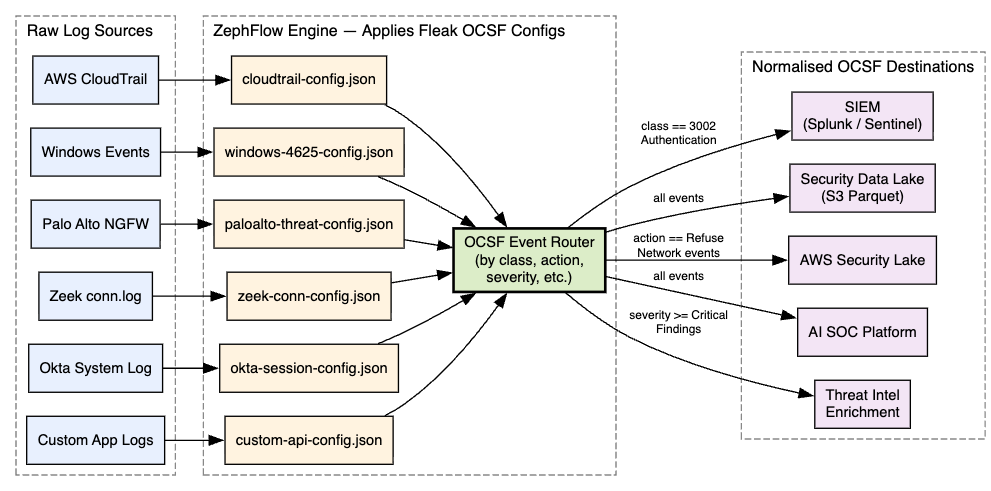
For Security Operations: ZephFlow processes your logs at runtime using the configurations you built in the Mapper. It is open-source, lightweight, and designed to run anywhere - your on-prem servers, your cloud VPC, edge infrastructure, or alongside existing Kafka or Kinesis streams.
The diagram below shows a production-grade ZephFlow deployment processing all six of our lab log sources simultaneously, routing normalised OCSF events to different downstream platforms:
# Simplified ZephFlow workflow definition - referencing Lab mapping configs

sources:
  - type: kinesis
    stream: raw-security-logs
    region: ap-south-1

        processors:
          - type: ocsf_transform
            config_file: ./mappings/cloudtrail-config.json    # exported from Lab 1
          - type: ocsf_transform
            config_file: ./mappings/windows-4625-config.json  # exported from Lab 2
          - type: route
            # Routes can match on any OCSF field: class, action, severity, etc.
            rules:
              - match: "severity >= 'Critical'"      # Critical findings → threat intel enrichment
                destination: findings-sink
              - match: "action == 'Refuse'"           # Refused/blocked traffic → Security Lake
                destination: network-events-sink
              - match: "class_uid == 3002"            # Authentication events → SIEM
                destination: auth-events-sink

sinks:
  - name: auth-events-sink
    type: splunk
    index: ocsf_authentication
  - name: network-events-sink
    type: s3
    bucket: security-data-lake
    prefix: ocsf/network/
    format: parquet
  - name: findings-sink
    type: kinesis
    stream: threat-intel-enrichment-queue
08 - The Honest Verdict: 360-Degree Evaluation
What Works Well
AI classification accuracy for major log sources. JSON log Examples validate this directly. For well-known log formats, majority of the time AI correctly identified not just field mappings but the semantic intent of events, including activity IDs and status codes.
Handling of unstructured syslog text. Non-json log files (unstructured) test this directly. The mapper handles both structured JSON and non-structured JSON very well without taking any parser input from me.
Exportable, versionable configuration files. Human-readable output that fits naturally into Git workflows, code review, and change management.
What Needs Work
Accuracy degradation on obscure or custom log formats. Lab 5 (custom app log) demonstrates this directly - anomaly_flags, transfer_amount_usd, and business-context fields require manual decisions. On truly custom formats, expect 30–60 minutes in the Visual Editor per mapping.
Schema drift handling in production is not fully demonstrated. When AWS adds a new CloudTrail field, what exactly happens? Silent drop? Alert? Extension storage? This is critical for production stability.
No native MITRE ATT&CK enrichment layer. Lab 3 contains CVE-2021-44228 (Log4Shell), which maps directly to ATT&CK T1190. The mapper produces an OCSF finding but does not tag the ATT&CK technique. That enrichment step must happen downstream.
Feature Comparison Against Alternatives
| Capability | Fleak OCSF Mapper | Manual Engineering | SIEM Native Parser |
|---|---|---|---|
| AI-assisted field mapping | ✅ YES | ❌ NO | ❌ NO |
| OCSF-native output | ✅ YES | ✅ YES | ❌ NO |
| Portable config files (GitOps ready) | ✅ YES | ✅ YES | ❌ NO |
| Free to use for authoring | ✅ YES | ✅ (just time) | ⚠️ Bundled |
| Handles unstructured syslog text | ✅ YES | ✅ YES | ⚠️ VARIES |
| Real-time testing in UI | ✅ YES | ❌ NO | ⚠️ LIMITED |
| Confidence scoring on AI suggestions | ❌ NOT YET | ❌ N/A | ❌ NO |
| MITRE ATT&CK tagging at ingestion | ❌ NOT YET | ⚠️ MANUAL | ❌ NO |
| Air-gapped / on-prem deployment | ✅ YES (ZephFlow) | ✅ YES | ✅ YES |
The Broader Context: Why This Matters for AI SOC
There is a direct line between the work Fleak is doing and the AI SOC evolution that the industry is navigating. The first wave of AI SOC platforms failed partly because they were trying to build intelligent analysis on top of fragmented, unnormalised data. The result was expensive queries, inconsistent results, and analysts who ended up going directly to JSON logs anyway because the AI summaries could not be trusted.
The diagram below illustrates exactly what the data layer looks like before and after OCSF normalisation - and why this matters so much for AI model accuracy:
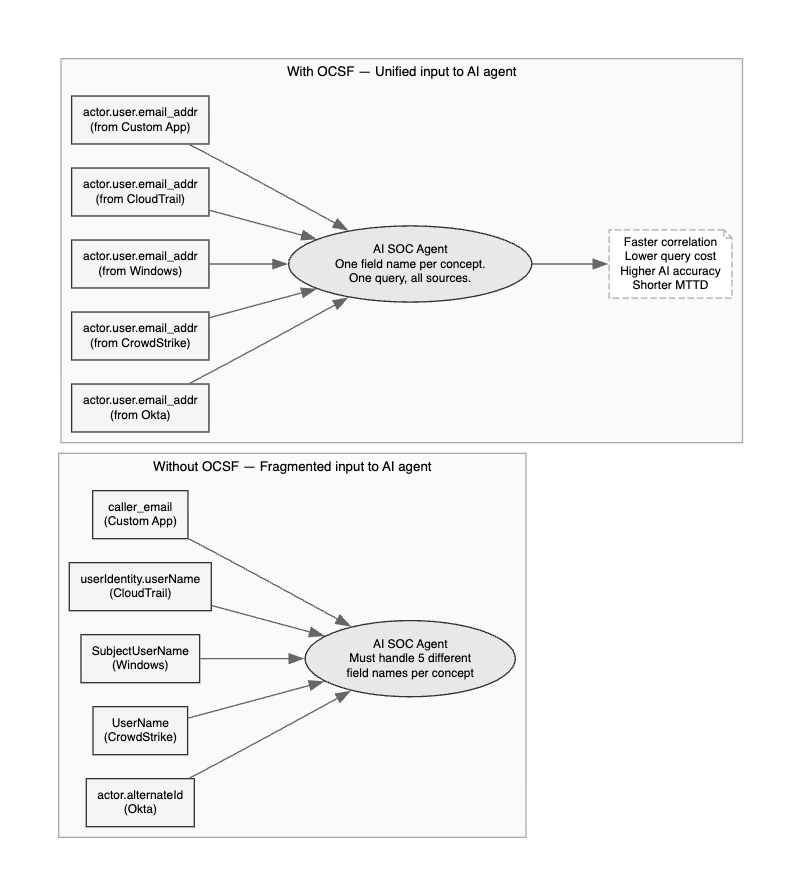
The majority failure rate of AI agent projects within 30 days is not primarily a model quality problem. It is a data quality problem. Models trained on or prompted with normalised, semantically consistent data outperform models dealing with fragmented vendor dialects - by a wide margin.
Final Thoughts
The Fleak OCSF Log Mapper is a genuinely useful, honestly-priced tool that tackles a real and significant problem in security data engineering. The AI mapping quality is impressive for major log sources - the six hands-on labs in this post validated that directly. The architecture - separating authoring from execution, producing portable config files - is sound and production-friendly. The gaps (confidence scoring, ATT&CK enrichment, obscure format accuracy, enterprise runtime maturity) are real but not disqualifying.
The five labs give you everything you need to evaluate this tool against your actual environment. Load your own versions of these log samples. Compare the AI’s output to what you know the correct OCSF mapping should be. That direct comparison - more than any benchmark or analyst report - will tell you whether this tool belongs in your security data engineering stack.
Links:
- Tool: app.ocsf.fleak.ai
- Docs: docs.fleak.ai/ocsfmapper/intro
- Runtime: github.com/fleaktech/zephflow-core
- OCSF Schema Browser: schema.ocsf.io
- Diagram Renderer: dreampuf.github.io/GraphvizOnline
Disclosure & Methodology: This review was conducted using the publicly available free version of the Fleak OCSF Mapper at app.ocsf.fleak.ai. No commercial relationship with Fleak exists. Sample logs in the hands-on labs are synthetic but constructed to be structurally accurate representations of real vendor log formats. OCSF output accuracy was validated against the official OCSF schema at schema.ocsf.io. ZephFlow was evaluated at the documentation and architecture level; production load testing was not conducted. All opinions expressed are independent.